The Best Day Trade Dash Alternatives in 2026: 6 Tools by Job

Named to the Inc. 5000 list of America’s fastest-growing private companies six years in a row (2017–2022).
Investopedia: Best Short Term Stock Screener, 2024
The short answer: Pick the alternative that covers the part of Day Trade Dash you rely on. If you want ready-made scans, a free live room and room to grow, Trade Ideas pairs Channel Bar presets with the free Trading Room. For a scanner you build yourself, Scanz. For small-cap training, StocksToTrade. For charts, TradingView. Trade Ideas makes one of the tools on this page.
This page is on Trade Ideas' own website. See our Trade Ideas vs Day Trade Dash page for a head-to-head view.
Day Trade Dash alternatives, by what you need
- Presets plus a free Trading Room: Trade Ideas.
- Scans you write from scratch: Scanz.
- A scanner bundled with small-cap lessons: StocksToTrade.
- News and catalysts: Benzinga Pro.
- Charts: TradingView.
- Charting on a budget: TC2000.
- Stay with Day Trade Dash if you want the precise scanners Ross Cameron calls out, inside the same software.
What Day Trade Dash does well
Day Trade Dash is the scanner software Warrior Trading sells. You get 24 preset scanners, charts powered by TradingView and a curated news feed in one window.
Warrior says these are the same tools Ross Cameron uses. Real-time market data comes with the subscription.
If you follow Ross and want his scanners without building your own, it is a neat package.
Trade Ideas vs Day Trade Dash has the complete feature comparison.
Why traders choose Trade Ideas as a Day Trade Dash alternative
- They want the live room included. A Day Trade Dash-only plan leaves out the chat room and live stream. The Trade Ideas Trading Room is free.
- They want to test before they trade. The Day Trade Dash page does not list a no-code backtester.
- Growing beyond 24 presets. Some traders want 310 alerts and 249 filters, Holly and OddsMaker.
- They want premium tools without a course bundle. Channel Bar presets and the Holly AI Assistant are in TI Pro on every Trade Ideas plan.
How we compared Day Trade Dash alternatives
Every Day Trade Dash alternative was scored on the same six points. See How we checked for the sources.
- Replaces: the slice of Day Trade Dash, from presets to the simulator, a tool could replace.
- Real-time data: what is live on each plan, according to the vendor.
- Backtesting: can you test a momentum setup on past data?
- AI: AI features that appear on the vendor's own pages.
- List price: monthly and annual rates as posted.
- Best for: the trader each tool serves.
Day Trade Dash alternatives, side by side
| Tool | Replaces which part of Day Trade Dash | Real-time data | Backtesting | AI | List price | Best for |
|---|---|---|---|---|---|---|
| Trade Ideas | Preset scanner software role | Yes, live market data on both plans | OddsMaker, no code (TI Premium / Apex) | Holly AI Signals with TI Premium; the Holly AI Assistant with any TI Pro plan | Standard (Core): $127 monthly, $1,068 yearly. Premium: $254 monthly, $2,136 yearly | Trading Room and Channel Bar software |
| Scanz | Configurable real-time scanner | Yes, all plans | Not listed | Not listed | Starter $89, Pro $199, Ultra $999 a month | Fixed playbook scanners |
| StocksToTrade | Training plus small-cap scans | Real-time Level 1 | Not listed | Oracle algorithm | $179.95/mo or $1,899.50/yr | Small-cap training |
| Benzinga Pro | News plus scanner on Essential | Real-time quotes on paid plans | Not listed | Benzinga AI (Essential) | Basic $37 to Essential $197 a month | News-driven traders |
| TradingView | Charts | Screener auto-refresh on paid plans | Strategy backtesting; Bar Replay | AI screener requests | Basic $0; paid plans from $12.95/mo billed annually | Chart-first traders |
| TC2000 | Charts and scans | Real-time scanning on Premium | Not listed | Not listed | Basic $24.99 to Premium+ $99.99/mo | Budget charting |
Swipe left on the table for the rest of the columns.
"Not listed" tells you only that the vendor's pages didn't show it.
The 6 best Day Trade Dash alternatives
-
1. Trade Ideas
Best for ready-made channels plus a free live Trading Room
Day Trade Dash gives you presets. Trade Ideas gives you presets and a free room to learn in. The Trading Room costs nothing, and Channel Bar channels are ready in every plan, so there is nothing to configure. TI Premium adds Holly AI Signals and OddsMaker. Compare details in Trade Ideas vs Day Trade Dash and Trade Ideas vs Warrior Trading.
Replaces: The preset scanner software, with a free live room and more tools for later.
- Real-time data
- Live market data on TI Standard and TI Premium. Streaming Alerts can fire on every trade.
- Scans and alerts
- 310 alerts and 249 filters when you outgrow presets. Channel Bar channels come with every TI Pro plan. The Holly AI Assistant turns a plain-English request into a working scan.
- Backtesting
- OddsMaker tests a preset or your own scan on Trade Ideas history. No code. TI Premium.
- AI
- Holly AI Signals, on TI Premium, post an entry, a stop and a target as the day unfolds.
- Beginner-friendly
- Yes. Presets work out of the box. In the free Trading Room, Barrie Einarson walks through trades live.
- Price
- TI Standard $127 a month, $1,068 a year. TI Premium $254 a month, $2,136 a year. Trading Room: free.
Past the presets. Each of Ross's preset types is one recipe. Trade Ideas documents 310 alerts and 249 filters in its help, and you can combine any alert with any filters, each filter set by its own minimum and maximum. On top of that, 191 alerts have a setting of their own: Running Up Now lets you require a minimum dollar move in the last minute, and the 1-minute volume spike lets you set how many times normal volume counts as a spike. A single alert with just two filters already gives 9,571,560 possible pairings before you type a value, so the number of scans you can build is effectively unlimited. The open is covered from the 1-minute opening range breakout out to the 60-minute range, with a breakdown version of each, plus the bullish opening power bar and candle alerts such as the 5-minute hammer.
Worth knowing: Trade Ideas covers US-listed stocks. The higher plan, TI Premium, is the one with Holly AI Signals, OddsMaker and Money Machine. TI Pro is Windows only; on a Mac, the web Dashboard runs in your browser without a download, while alert windows and Holly stay in TI Pro.
Presets are just the start. Type one sentence and the AI Assistant sets up the scan, or open the configuration menu and mix 310 alerts with 249 filters by hand, no code involved. A filter that doesn't exist yet can be written in the Formula Editor. Testing that filter is an OddsMaker job, and OddsMaker comes with TI Premium, alongside Holly AI Signals that give an entry, stop and target throughout the session.
Best fit: Momentum traders who like presets but want a free room and more depth, and beginners after the premium experience.
-
2. Scanz
Best for writing your own scans instead of presets
Scanz is a real-time scanner you configure yourself. Its scans cover data, signals, news and SEC filings.
Replaces: Preset momentum scanners, plus Level 2 data.
- Real-time data
- Real-time data on all plans, including premarket and after-hours sessions.
- Scans and alerts
- Scans come from 400+ filters. Starter runs a single scan. Pro has no cap.
- Backtesting
- Not listed.
- AI
- Not listed.
- Beginner-friendly
- Fair. You decide what to scan for, so a plan helps. There is a 7-day free trial.
- Price
- $89 a month for Starter, $199 for Pro and $999 for Ultra. Scanz also lists a free plan, with delayed data.
Worth knowing: On Starter only one scan runs at a time. Scanz lists no live teaching room.
Best fit: Traders with a set playbook who want to build scans, not borrow them.
-
3. StocksToTrade
Best for small-cap training with a scanner
StocksToTrade is day-trading software with pre-built screeners and a training library.
Replaces: Course-style training plus preset small-cap scanners.
- Real-time data
- Real-time Level 1 data is included, and paper trading uses it too.
- Scans and alerts
- Pre-built screeners target fast-moving penny stocks. It also markets its Oracle algorithm.
- Backtesting
- Not listed. Paper trading is included.
- AI
- The Oracle algorithm.
- Beginner-friendly
- Yes. StocksToTrade University adds training videos and support. Paid rooms, such as Small Cap Rockets at $50 a month, are listed.
- Price
- $179.95 a month, or $1,899.50 a year.
Worth knowing: Level 2 data ($29 a month) and Breaking News Chat ($49 a month) are add-ons. A backtester is not listed on its pricing or features pages.
Best fit: Small-cap and penny stock traders who want training in the same subscription as their scanner.
-
4. Benzinga Pro
Best for headline-driven trading
Benzinga Pro is a news service first. On top of the headlines it adds audio squawk, a calendar suite and a real-time scanner.
Replaces: The curated news feed, plus a scanner on Essential.
- Real-time data
- All paid plans carry real-time quotes from Nasdaq Basic. Essential includes the Real-Time Scanner.
- Scans and alerts
- Benzinga says the scanner tracks 3,000+ stocks. Streamlined adds price, volume and float filters to the newsfeed.
- Backtesting
- Not listed.
- AI
- Essential includes Benzinga AI research.
- Beginner-friendly
- Yes. The news shows why a stock is moving. A 14-day free trial is offered.
- Price
- Basic $37, Streamlined $147, Essential $197 a month. Annual billing is cheaper.
Worth knowing: You need Essential, the $197 plan, for the Real-Time Scanner. No live teaching room is listed.
Best fit: Traders whose ideas start with a headline rather than a preset scan.
-
5. TradingView
Best for charts on their own, without a preset scanner bundle
Day Trade Dash already uses TradingView-powered charts. TradingView itself sells those charts directly, with screeners for stocks, ETFs and crypto across 150+ exchanges in 50+ countries. Custom studies run on Pine Script.
Replaces: The chart window, plus screening that reaches outside the US.
- Real-time data
- The screener auto-refreshes every 10 seconds or every minute on paid plans. Real-time feeds for some exchanges cost extra.
- Scans and alerts
- You screen on 500+ fundamental and technical fields. TradingView also lists Pine Screener and alerts.
- Backtesting
- Strategy backtesting is listed, along with Bar Replay for practice.
- AI
- AI screener requests come with paid plans, from 100 up to 500.
- Beginner-friendly
- Yes. Basic is a free plan.
- Price
- $0 for Basic. Paid tiers billed annually: Essential $12.95, Plus $29.95, Premium $59.95 a month (special price on Oct 5, 2026).
Worth knowing: You need a paid plan for screener auto-refresh. Studies are coded in Pine Script, not Python.
Best fit: Traders who liked the Dash charts and want them without the scanner subscription.
-
6. TC2000
Best for charts and scans at a lower monthly cost
TC2000 builds scanning into its charting software. You write your own scans instead of using a preset list.
Replaces: Charts, plus technical searches you define.
- Real-time data
- Nasdaq Basic supplies the real-time US stock data on the Basic plan. Real-time scanning and sorting are Premium features.
- Scans and alerts
- Scan with indicators, formulas or chart data. Up to five streaming scans run together.
- Backtesting
- Not listed.
- AI
- Not listed.
- Beginner-friendly
- Fair. It is chart-focused, with paper trading built in.
- Price
- $24.99 for Basic, $49.99 for Premium, $99.99 for Premium+, each per month. Annual plans include two free months.
Worth knowing: Premium is where real-time scanning starts.
Best fit: Chart-centered traders who would rather build scans than buy presets.
Who should stay with Day Trade Dash
Day Trade Dash fits a lot of Warrior students. Stick with it if one of these applies.
- You trade Ross Cameron's playbook. Day Trade Dash was designed to show the scanners he calls out.
- You want the charts in the same subscription. Day Trade Dash ships with TradingView-powered charts.
- You are already a Warrior member on the member price. Member pricing lowers the monthly cost.
- The bundled simulator with Level 2 is your practice setup. Warrior sells that with Day Trade Dash or alone.
Switching from Day Trade Dash: what carries over
Trade Ideas is software you can use without a course, with a free Trading Room and Channel Bar presets so a beginner gets the premium setup. Day Trade Dash is the preset scanner software from Warrior. For more detail, read Trade Ideas vs Day Trade Dash and Trade Ideas vs Warrior Trading.
| If you use this in Day Trade Dash | In Trade Ideas |
|---|---|
| 24 preset scanners | Channel Bar presets in every plan. Big Momentum Movers is the closest first stop. |
| TradingView-powered charts | Charts are built in. External Linking can also send a symbol to your own TradingView chart. |
| Web simulator | Paper trading on live prices, included with TI Standard. |
| Curated news feed | Trade Ideas finds stocks by price and volume. Add a news source if you want headlines. |
| Added when you switch | The Trading Room, free with Barrie Einarson, Monday to Friday, 8:00am to 3:30pm ET. |
| Added when you switch | Holly AI Signals with an entry, a stop and a target, on TI Premium. |
| Added when you switch | OddsMaker, the no-code tester on TI Premium. |
| Added when you switch | 310 alerts and 249 filters for when presets are not enough. |
Move the table sideways to compare both columns.
The Trade Ideas Trading Room is free
Barrie Einarson leads the room. He trades live Monday through Friday, 8:00am to 3:30pm ET, and a community of traders follows along with him.
Channel Bar and Streaming Alerts
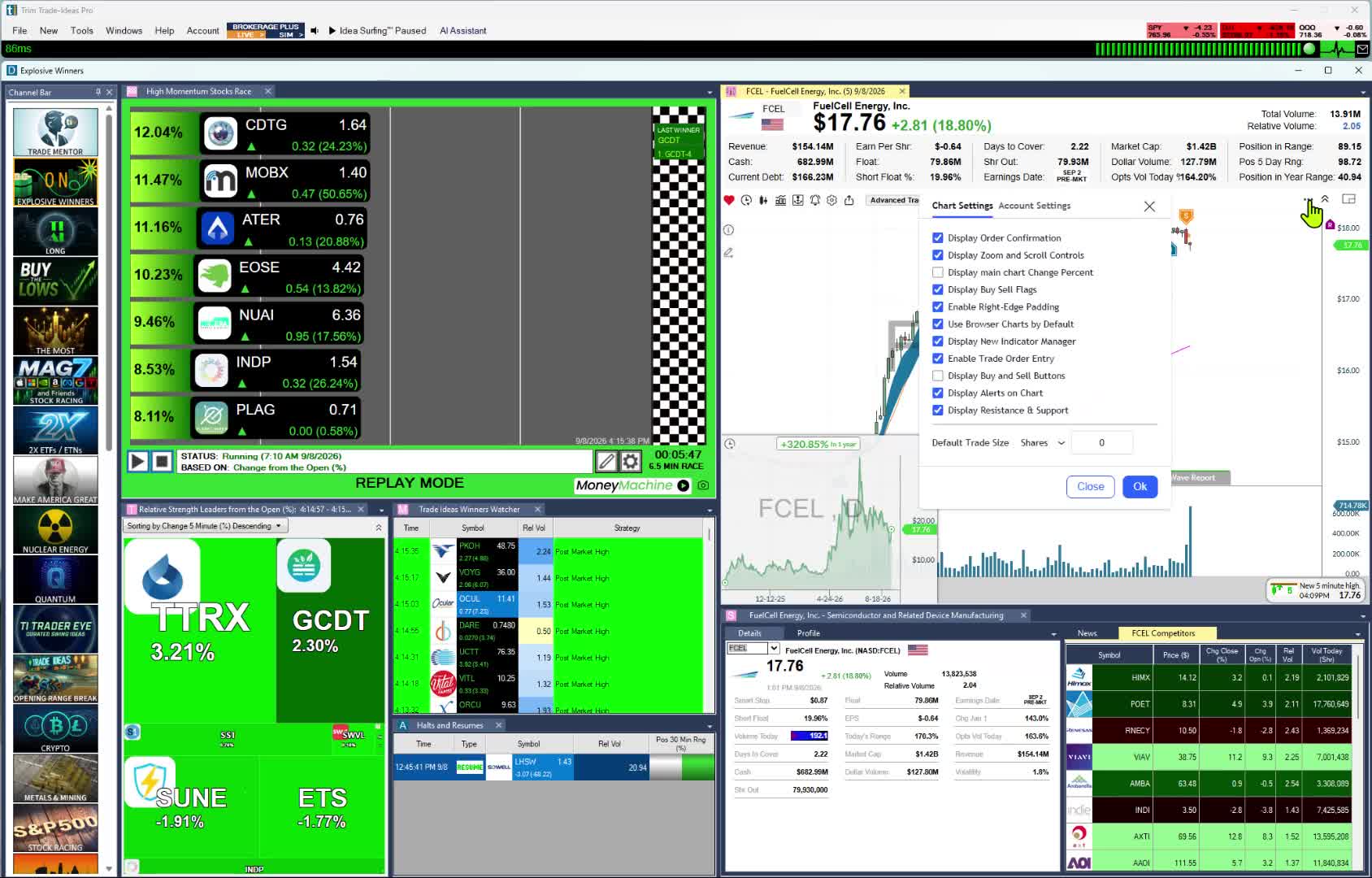
The Channel Bar replaces the preset list. Dash users coming from the browser should know it lives in TI Pro, the Windows app, and comes with every plan. Big Momentum Movers and S&P 500 stocks moving up quickly are ready on day one. See Trade Ideas for beginners.
Streaming Alerts work as the scanner, and Top Lists refresh every 15 seconds as the screener. Both use live market data.
Holly AI Signals and OddsMaker
TI Premium adds Holly AI Signals. Each signal comes with an entry, a stop and a target during market hours. Exit the same day or hold, your choice.
OddsMaker shows how a preset would have played out on Trade Ideas history, with no code.
Past results, including backtests, don't guarantee future results.
Leaving Day Trade Dash in six steps
- Pick TI Standard or TI Premium. Standard swaps the Dash presets for Streaming Alerts and Top Lists, with paper trading and the Holly AI Assistant included. Premium is for traders who want AI trade plans and testing too, through Holly AI Signals, OddsMaker backtests and Money Machine automation.
- Replace your presets. Where you had Ross's preset list, open the Channel Bar and pick Big Momentum Movers.
- Rebuild a Ross-style scan. Describe it to the AI Assistant, or start from a new high alert.
- Keep practicing. Paper trading takes the place of the simulator, on live prices.
- Prove the setup. On TI Premium, run it through OddsMaker before real money.
- Join the room. The Trading Room costs nothing. New traders can start with Trade Ideas for beginners.
What Day Trade Dash and Trade Ideas cost
Day Trade Dash
- Day Trade Dash: $197 monthly, or $147 for Warrior Starter or Pro members
- Day Trade Dash plus web simulator: $247 monthly, or $197 for members
- Simulator alone: $97 a month
Real-time data is part of the price. Warrior offers a two-week test drive for $19. The live room costs extra. We checked these prices on October 6, 2026.
Trade Ideas
- TI Standard: $127 a month; $1,068 billed yearly (roughly $89 a month)
- TI Premium: $254 a month; $2,136 billed yearly (roughly $178 a month)
The Trading Room is free with any plan, or none. In TI Pro, the Channel Bar and the Holly AI Assistant come with your plan, whichever it is. If you want Holly AI Signals with your scans, plus OddsMaker and Money Machine, that is TI Premium.
Prices shown are from October 6, 2026. Recheck both sites before you buy.
How we checked
- Vendor pages only. What we say about Day Trade Dash and the rest comes from each company's own site.
- Reading "not listed." The feature was not on the pages we checked. It may still exist.
- Why Trade Ideas is listed first. Day Trade Dash users who move on usually want a free live room, presets that work on day one and tools to grow into. Trade Ideas covers all three. It is our product, so try the others too.
- How the rest are ordered. Software with a room and presets first, then scanners you configure, training, news and charts.
- No grades. We do not score or star any tool here.
Every source, as of October 6, 2026: trade-ideas.com/pricing; warriortrading.com/day-trade-dash; scanz.com/pricing; stockstotrade.com/pricing; pro.benzinga.com/pricing; tradingview.com/pricing; tc2000.com/pricing.
Change log: published October 6, 2026. All Day Trade Dash and competitor facts were checked on that date.
Day Trade Dash alternatives: FAQ
What is the best alternative to Day Trade Dash?
If you want presets that need no setup plus a free Trading Room, our pick is Trade Ideas. It is our software, so compare before you choose. If you need the exact scanners Ross Cameron calls out, Day Trade Dash is still the match.
Is there a free alternative to Day Trade Dash?
In part. The Trade Ideas Trading Room is free, and TradingView Basic is $0. Trade Ideas software requires a paid plan. Day Trade Dash offers a $19 two-week test drive.
What is the cheapest Day Trade Dash alternative?
Checked October 6, 2026: TradingView Essential was $12.95 a month with annual billing, and TC2000 Basic was $24.99 a month. Day Trade Dash was $197 a month, or $147 for Warrior members.
Is Trade Ideas good for beginners?
Yes. For someone who learned on Ross Cameron's preset scanners and wants more room, Trade Ideas is a good fit for a beginning trader who wants the premium experience. With TI Pro's ready-made Channel Bar channels, there is nothing to configure. You also get the Holly AI Assistant in TI Pro, on Standard or Premium. Start with Trade Ideas for beginners.
What does Trade Ideas cost versus Day Trade Dash?
As of October 6, 2026, Day Trade Dash cost $197 a month ($147 for Warrior members), or $247 with the simulator ($197 for members). Trade Ideas, with paper trading included on both plans, listed TI Standard at $127 per month or $1,068 per year and TI Premium at $254 per month or $2,136 per year. The Trading Room is free.
Is Trade Ideas just for day trading?
No. Holly AI Signals fire in market hours, yet you can hold a trade past the close. Swing traders and investors use Streaming Alerts and Top Lists to time entries too.
Is Day Trade Dash the same as Warrior Trading?
Day Trade Dash is the scanner software. Warrior Trading is the company, and it also sells courses and a live room. Read Trade Ideas vs Day Trade Dash and Trade Ideas vs Warrior Trading for each comparison.
Can I run Day Trade Dash beside Trade Ideas?
Yes. Some traders keep Day Trade Dash for Ross's presets. They add Trade Ideas for the free Trading Room, the Channel Bar and OddsMaker.